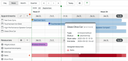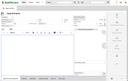
The planning board lets you manage appointments that were created using JustRelate CRM. As a default, appointments of the "Service action" and "Maintenance action" type can be accessed in the planning board, however, administrators can freely define which types of appointments should appear in the planning board.
If your CRM data pool does not yet include such an appointment, simply create one, assign a couple of attendees, i.e., contacts, and also add a resource to it to see how all this works. See Service management in the JustRelate CRM documentation for more information on how the CRM supports you in this area.